How IP lookup works Published: 18 Jun, 2026
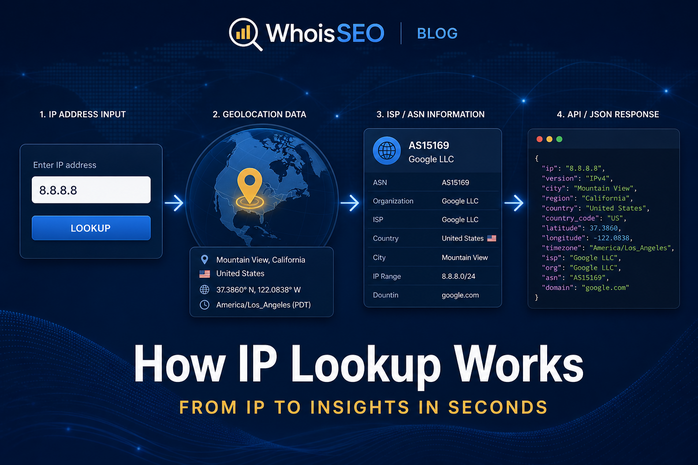
IP lookup is the process of querying databases and network services to learn what an IP address represents: approximate geographic location, Internet Service Provider (ISP), autonomous system number (ASN), hostname, and sometimes proxy or hosting classification.
Security teams, webmasters, and curious users run IP lookups daily. This guide explains how lookup works under the hood, which data sources are used, accuracy limits, and how to run a free check on WhoisSEO IP lookup.
What triggers an IP lookup?
Common scenarios:
- Security logs — identify attackers or brute-force sources.
- Fraud prevention — flag VPN, hosting, or high-risk countries at checkout.
- Compliance — coarse geo restrictions for content licensing.
- Networking — verify which ISP owns a range before peering discussions.
- Personal curiosity — “What is my public IP?” after VPN changes.
Forward path: from IP to metadata
- Input validation — confirm IPv4 or IPv6 format.
- WHOIS/RDAP for the IP range — which organization received the allocation (RIR data).
- GeoIP databases — commercial and community mappings of ranges to cities and countries.
- Reverse DNS (PTR) — optional hostname like
server1.hosting.com. - Threat intelligence — optional feeds for proxies, Tor exits, or abuse reports.
Web tools aggregate these steps into one readable report.
Data sources behind geolocation
No global GPS chip exists in IP addresses. Providers infer location from:
- Regional Internet Registry allocation records.
- BGP routing announcements (which networks announce which prefixes).
- Latency measurements from probe servers worldwide.
- User-contributed corrections over time.
Accuracy is best at country level; city level can be wrong for mobile, satellite, and corporate VPN egress.
ISP and ASN identification
The ASN (Autonomous System Number) identifies a network operator—Comcast, Google, AWS, etc. IP lookup maps the address to an ASN and friendly ISP name. Hosting IPs often show datacenter cities rather than visitor homes.
Reverse IP lookup
Given a domain, forward DNS finds an IP. Reverse IP lookup starts from the IP and lists domains hosted on the same server—useful on shared hosting. WhoisSEO guide: what is reverse IP lookup?
IP lookup vs WHOIS vs DNS
- IP lookup — metadata about an address.
- WHOIS (domain) — registration for a domain name (WHOIS tool).
- DNS lookup — records for a hostname (DNS tool).
Accuracy and limitations
- VPNs and proxies show exit node location, not the user’s true region.
- Mobile carriers may centralize egress far from the user.
- Corporate NAT — entire offices share one public IP.
- IPv6 privacy extensions rotate addresses on devices.
Read is IP geolocation accurate?
How to run an IP lookup (free)
- Visit WhoisSEO IP lookup.
- Enter any public IPv4 or IPv6 address—or use your own detected IP.
- Review country, region, city, ISP, ASN, and map coordinates when available.
- For domains on shared hosts, follow reverse IP or hosting intelligence links if offered.
Responsible use
IP data is imprecise and regulated in some jurisdictions. Do not use geolocation alone for high-stakes decisions (credit, employment, legal accusations). Combine signals and respect privacy laws.
API and automation
Developers embed IP lookup APIs in login flows, analytics pipelines, and WAF rules. Cache results responsibly—ISP assignments change. Rate-limit public endpoints to prevent abuse. WhoisSEO and similar tools expose JSON for integration alongside browser UI.
Enterprise vs consumer perspectives
Enterprises map office egress IPs for allowlists. Consumers use lookup to verify VPNs or debug streaming geo-blocks. Threat hunters correlate IPs with passive DNS and WHOIS for domains hosted on the same infrastructure.
FAQ: IP lookup
Can IP lookup find a street address? Rarely with legal public data—city/region is typical.
Why does lookup show the wrong country? VPN exit, corporate routing, or stale GeoIP database.
Do IPv6 lookups work? Yes—enter full IPv6 notation in modern tools.
Is reverse lookup the same? No—reverse starts from IP to hostnames or co-hosted domains.
Building IP intelligence into applications
SaaS login flows often score IP reputation: datacenter IPs at signup may require email verification; impossible travel (login from US then Russia in five minutes) triggers step-up auth. Log ASN and country alongside user IDs for forensics. Cache GeoIP locally with weekly refresh—stale data mislabels mobile users. Combine IP signals with device fingerprinting and behavioral analytics rather than blocking solely on country unless compliance mandates it.
For abuse desks, correlate WHOIS on domains served from the IP with reverse DNS hostnames—patterns emerge for bulletproof hosting and phishing clusters.
Whether you are a developer adding fraud scores or a site owner checking visitor logs, treat IP lookup as one signal in a broader security and analytics program—not a definitive identity proof.
Re-run lookups after major network changes (new ISP, VPN provider, or cloud region migration) because geolocation databases update on different schedules than routing tables.
Conclusion
IP lookup translates numeric addresses into human context—where traffic likely originates and who operates the network. Understand the inference limits, pair lookups with other evidence, and use reliable tools for consistent results.
Related: What is an IP address? · Best IP lookup tools · Free IP lookup