Simple explanation of DNS for beginners Published: 18 Jun, 2026
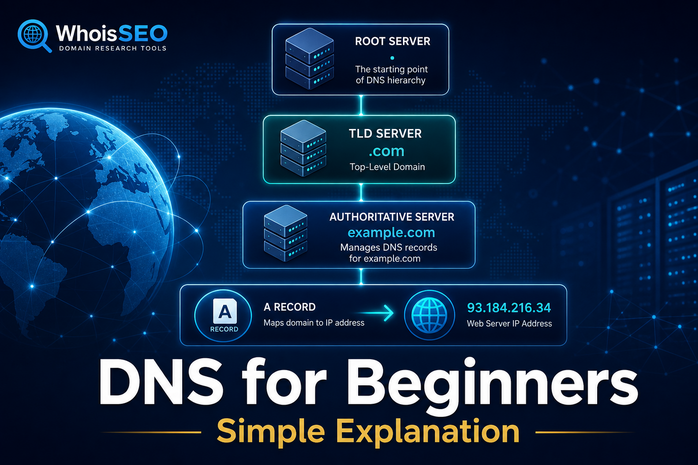
Every time you visit a website, your device must find the correct server on the internet. Humans type memorable names like whoisseo.com, but networks route traffic using numeric IP addresses. The Domain Name System (DNS) sits between those two worlds—it is often called the internet’s phonebook because it translates domain names into addresses your browser can use.
If you are new to domains, hosting, or website troubleshooting, DNS can feel abstract. This guide explains DNS in plain language: what it does, how a lookup travels across servers, which record types matter, and how to verify DNS for any domain with free tools on WhoisSEO.
What is DNS?
DNS (Domain Name System) is a global, distributed database that maps hostnames to technical data—most importantly IP addresses. Without DNS, you would need to remember numbers such as 93.184.216.34 instead of example.com.
According to ICANN, the organization that helps coordinate the DNS root, the system exists so users can navigate the internet using readable domain names while devices still communicate with IP addresses behind the scenes.
DNS is not a single server. Thousands of resolvers, root servers, TLD servers, and authoritative name servers cooperate so lookups complete in milliseconds—usually without you noticing.
Why DNS matters for website owners
DNS controls where your domain points. Change an A record and your website may move to a new host. Change MX records and email delivery shifts to a different provider. Misconfigured DNS is one of the most common reasons a site “worked yesterday” but fails today.
- Website availability — browsers need A or AAAA records to reach your server.
- Email delivery — MX and TXT (SPF/DKIM) records must be correct.
- Security — unexpected NS or TXT changes can signal hijacking.
- SEO — apex vs
www, redirects, and CDN proxies all depend on DNS.
WHOIS tells you who registered a domain; DNS tells you where it points right now. Use WHOIS lookup for registration context, then DNS lookup for live technical answers.
How a DNS lookup works (step by step)
When you open whoisseo.com in a browser, a chain of queries runs automatically. Cloudflare and other operators describe this as DNS resolution—turning a hostname into an IP address.
- Browser cache — your device may already know the answer from a recent visit.
- Operating system cache — a short-term local store of recent lookups.
- Recursive resolver — usually your ISP or a public resolver (1.1.1.1, 8.8.8.8) does the heavy lifting.
- Root nameserver — points the resolver to the correct TLD server (e.g.
.com). - TLD nameserver — identifies the authoritative name servers for your domain.
- Authoritative nameserver — returns the actual records (A, AAAA, MX, etc.).
- Answer returned — the resolver caches the result (based on TTL) and your browser connects to the IP.
This entire path typically completes in tens of milliseconds. If any step fails, you may see “DNS_PROBE_FINISHED_NXDOMAIN” or similar errors.
Key DNS terms beginners should know
- Domain name — human-readable label like
example.com(see what is a domain name?). - IP address — numeric network location (IPv4 or IPv6).
- Record — a row in DNS (A, MX, TXT, etc.). Read what are DNS records?
- TTL (Time to Live) — how long resolvers may cache an answer before asking again.
- Name server (NS) — the server that holds the official zone file for a domain.
- Zone — the collection of DNS records for a domain.
Common DNS record types (quick overview)
You do not need to memorize every record on day one, but these appear in almost every troubleshooting session:
- A — IPv4 address for a hostname (A record guide).
- AAAA — IPv6 address.
- CNAME — alias pointing to another name.
- MX — mail server priority and hostname.
- TXT — text used for SPF, DKIM, domain verification.
- NS — delegation to authoritative name servers.
Run a combined check on WhoisSEO DNS lookup to see multiple record types in one view.
DNS vs WHOIS vs IP lookup
Beginners often mix these tools:
- WHOIS — registration: registrar, dates, status, sometimes owner (if not redacted). Try WHOIS lookup explained.
- DNS lookup — technical routing: where web and mail point today.
- IP lookup — geolocation and network data for an address. See IP lookup.
A domain can be registered at GoDaddy while DNS is hosted at Cloudflare and the website sits on a VPS elsewhere—three separate layers.
How to check DNS for any domain (free)
- Open WhoisSEO DNS lookup.
- Enter a domain (e.g. your own site or
example.com). - Review A/AAAA for hosting, MX for mail, NS for who controls DNS, TXT for verification strings.
- Compare results with your hosting dashboard—they should match after propagation.
- If email fails, verify MX priority and SPF in TXT before blaming the mail host.
After changing DNS, wait for TTL to expire worldwide. Lower TTL before major migrations to speed cutover.
Typical DNS problems (and what they mean)
- NXDOMAIN — the name does not exist in DNS (typo, expired zone, or missing record).
- Stale cache — you updated DNS but resolvers still return old IPs; wait or flush local cache.
- Wrong NS at registrar — the registrar still points to old name servers; updates at the DNS host have no effect.
- CDN proxy — services like Cloudflare may hide the origin IP in A records by design.
- Split DNS — internal corporate DNS differs from public DNS; public tools show only the internet-facing view.
For deeper troubleshooting, read common DNS failure reasons and why a domain may not work.
DNS security basics
DNS was designed for scalability, not authentication. Attackers may attempt DNS spoofing, hijacking, or phishing with look-alike domains. Protect your domains by:
- Enabling registrar lock and two-factor authentication.
- Monitoring NS and A record changes.
- Using DNSSEC where your provider supports it.
- Avoiding shared passwords on registrar and DNS panels.
Privacy services like WHOIS redaction do not hide public DNS—if a site is live, its records are queryable unless proxied.
Conclusion
DNS is the bridge between memorable domain names and the IP addresses that power the internet. You do not need to run your own name server to benefit from understanding it: know the lookup chain, recognize common record types, and verify changes with a reliable DNS tool.
Start with free DNS lookup on WhoisSEO, pair it with WHOIS for ownership context, and bookmark related guides as you build or manage websites.
Related reading: What is DNS lookup? · What are DNS records? · How DNS setup works · Domain vs hosting differences