What is a CDN? Published: 18 Jun, 2026
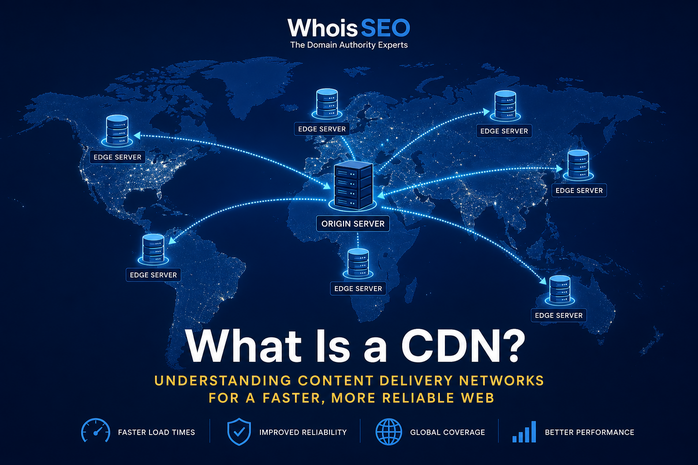
A CDN (Content Delivery Network) is a distributed system of edge servers that cache and deliver web content—HTML, images, videos, APIs—closer to end users. Instead of every visitor pulling files from one origin server across the ocean, a CDN serves copies from a nearby point of presence (PoP), reducing latency and load.
Major sites, SaaS platforms, and ecommerce stores rely on CDNs for speed and resilience. This guide explains how CDNs work, when you need one, impacts on DNS and SEO, and how to inspect domains with WhoisSEO DNS lookup.
The problem CDNs solve
Physics limits speed: light takes time to cross continents. A single origin in Virginia serves European users slowly. Traffic spikes can overwhelm one server. CDNs mitigate both by spreading cacheable assets globally.
Core CDN concepts
- Origin server — your real hosting where content is authored.
- Edge server (PoP) — CDN cache node in many cities.
- Cache hit — edge serves stored copy without contacting origin.
- Cache miss — edge fetches from origin, then stores for TTL.
- Purge/invalidation — force refresh when you deploy updates.
How a request flows through a CDN
- User DNS resolves your domain—often to CDN anycast IPs.
- User connects to nearest edge server.
- If cached and fresh, edge returns content immediately.
- If not cached, edge pulls from origin (shielding origin from repeat hits).
- TLS may terminate at the edge for faster handshakes.
Popular CDN providers
Cloudflare, Akamai, Fastly, Amazon CloudFront, Google Cloud CDN, and Bunny CDN serve different segments—from free proxies to enterprise media delivery. Many combine CDN with DDoS protection and WAF rules.
CDN and DNS
Enabling a CDN usually means updating A/AAAA or CNAME records to point at the CDN. Orange-cloud proxies hide origin IP—good for security, but DNS lookup shows CDN addresses, not your server. Guides: DNS records, connect domain to server.
CDN benefits
- Lower latency — faster page loads improve UX and Core Web Vitals.
- Scalability — absorb viral traffic without melting origin.
- Availability — failover if origin blips (stale cache may still serve).
- Security — DDoS absorption, bot management, TLS at edge.
- Bandwidth savings — fewer round trips to origin.
CDN and SEO
Google crawls CDN URLs normally. Ensure:
- Canonical URLs remain consistent (avoid duplicate hosts).
- HTTPS certificates are valid on all active hostnames.
- Do not block Googlebot at the CDN WAF accidentally.
- Purge cache after major template changes so crawlers see updates.
More: does domain affect SEO?
What should be cached?
- Great candidates — images, CSS, JS, static HTML fragments, video segments.
- Careful — HTML pages with personalized content (use cache keys or bypass).
- Avoid caching — authenticated account pages, carts with user-specific data unless engineered with edge logic.
When you might not need a CDN yet
Small blogs on decent shared hosting with local audiences may not justify complexity. CDNs shine at global traffic, heavy media, or strict performance SLAs.
Troubleshooting CDN issues
- Stale content — purge cache after deploy.
- Redirect loops — SSL mode mismatch between CDN and origin.
- 502/522 errors — origin down or firewall blocks CDN IPs.
- Geo blocks — CDN WAF rules too aggressive.
CDN metrics to monitor
Track cache hit ratio, origin offload percentage, time-to-first-byte at edge vs origin, and error rates by PoP. Sudden hit ratio drops may indicate misconfigured cache headers (Cache-Control: no-store on static assets).
Multi-CDN strategies
Large publishers sometimes use multiple CDNs for redundancy or regional pricing. DNS-based load balancing (geo-steering) sends EU users to one provider and APAC to another—operationally complex but improves resilience during provider outages.
FAQ: CDN basics
Is Cloudflare a CDN? Yes—plus DNS, WAF, and DDoS protection bundled.
Does CDN replace hosting? No—you still need an origin server or storage bucket.
Will CDN hide my server IP? When proxied, public DNS shows CDN edges—lock down origin firewall to CDN IPs only.
How do I verify DNS? Use DNS lookup after enabling CDN.
CDN cost and caching strategy
CDNs bill on egress, requests, and premium features (image optimization, workers). Small sites on generous free tiers may pay nothing until traffic grows. Set long cache lifetimes on versioned static assets (app.v123.js) while keeping HTML shorter TTL. Use stale-while-revalidate headers for resilience during origin blips.
Origin shield layers reduce load on your server by adding an intermediate cache between edge and origin—worth enabling for high-traffic media catalogs.
Before enabling full proxy mode, confirm your origin accepts connections only from CDN IP ranges to prevent attackers from bypassing the CDN and hitting your server directly.
Image optimization at the edge (WebP/AVIF conversion, responsive resizing) further improves Lighthouse scores without changing origin code—enable only after verifying visual quality for your brand assets.
Conclusion
A CDN accelerates and protects websites by caching content at the network edge. Pair CDN setup with correct DNS, monitor cache TTLs, and validate SEO crawling after enabling proxy features.
Related: DNS lookup · How networks work · Free DNS tool