How domains are registered Published: 02 Nov, 2026
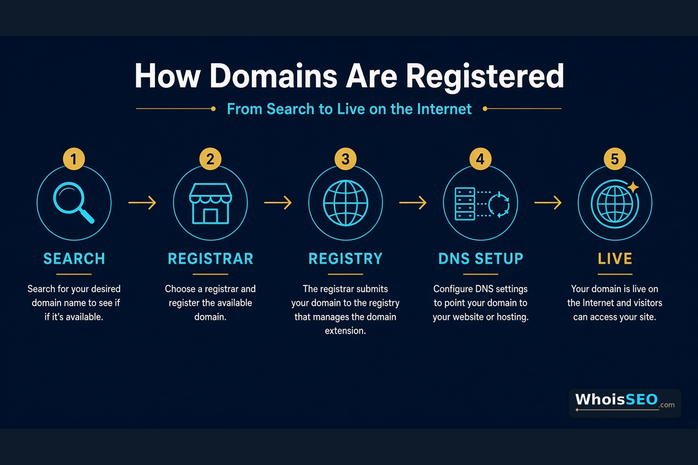
Registering a domain name is how you reserve a unique internet address—such as example.com—for a fixed period. The process looks simple in a checkout cart, but behind the scenes it involves accredited registrars, TLD registries, DNS delegation, and public registration records. This guide explains how domains are registered end to end, what happens after you pay, and how to verify ownership and setup with free WHOIS lookup and DNS lookup tools on WhoisSEO.
If you are still clarifying the basics, start with what is a domain name? then return here for the registration workflow.
Quick answer: how domain registration works
When you register a domain, you are not buying a permanent asset like land. You are leasing the right to use a name under a top-level domain (TLD) for one or more years. The typical chain is:
- You (registrant) choose a name and submit contact details.
- Registrar sells the name, bills you, and talks to the registry on your behalf.
- Registry is the authoritative database for that TLD (for example, the operator of
.comor.org). - DNS is configured so the world can resolve your name to servers and email.
- WHOIS / RDAP stores registration metadata others can query (often privacy-redacted).
Until the registry accepts the create command and name servers (or temporary parking DNS) are set, the name is not fully usable for a live website.
The parties involved in domain registration
Registrant
The person or organization that holds the registration. You are responsible for accurate contact data, renewals, and approving transfers. If a company owns the brand, register under the company—not a contractor’s personal email you may lose later.
Registrar
An accredited seller that provides the shopping cart, customer support, DNS panels, privacy options, and renewal reminders. You interact with the registrar every day; the registry rarely faces end users directly.
Registry
The operator of a TLD’s central database. Registrars send create, renew, update, and transfer commands to the registry. Policies such as reserved names, premium pricing, or local presence rules come from the registry (and applicable policy frameworks).
Resellers and hosting bundles
Many hosts resell domains under a larger registrar accreditation. Functionally you still get a registration—just confirm who controls transfers, auth codes, and lock settings before you build a critical brand on a promotional “free domain” offer.
Step-by-step: how domains are registered
- Search availability — Enter the second-level label plus TLD (e.g.
harboranalytics.com). Tools return available, taken, premium, or reserved. - Compare TLDs — Decide among
.com,.net,.org, country codes, or new gTLDs. See difference between .com, .net, and .org. - Pick a registrar — Prefer clear pricing (renewal, privacy, transfer), strong account security, and transparent DNS tools.
- Enter registrant contacts — Legal name, address, email, and phone. Wrong data can delay recovery or abuse handling.
- Add privacy / redaction if offered — WHOIS privacy replaces public personal details with a proxy or redacted fields. Learn more in WHOIS privacy protection.
- Choose the term — Usually 1–10 years. Longer terms reduce accidental expiry risk; auto-renew still matters.
- Pay and confirm — The registrar submits a create request to the registry. On success, the name is yours for the paid term.
- Set DNS — Point nameservers to your host or DNS provider, then publish A/AAAA, MX, and TXT records. Overview: what are DNS records?
- Secure the account — Enable two-factor authentication, registrar lock, and a recovery email you control long term.
What “availability” really means
A green “available” badge usually means the registry will accept a standard create for that label. Edge cases include:
- Already registered — Someone else holds it until expiry and deletion (or sale).
- Premium names — Short or dictionary words with higher create or renewal fees set by the registry or aftermarket.
- Reserved / restricted — Blocked for policy, trademark claims, geographic rules, or registry holds.
- Reserved at launch — New TLD phases (sunrise, landrush) can delay general availability.
- IDN variants — Unicode names may map to punycode (
xn--…); visually similar strings can be separate registrations.
Always re-check with WHOIS right before payment. Marketplace “for sale” pages are not the same as an open registry create.
Registration vs DNS vs hosting
These three services are often sold together—and often confused:
- Registration — Right to use the name in the TLD database.
- DNS — Technical records that map the name to IPs, mail servers, and verifications.
- Hosting — Where website files or applications run.
You can register at one company, host DNS at another, and host the site at a third. After checkout, confirm which nameservers are assigned and whether temporary parking pages are intentional. A fresh registration with no A/AAAA record will not show a website until you configure DNS—see also simple explanation of DNS for beginners.
What gets stored when you register
Successful registration creates (at minimum):
- Domain name and TLD
- Creation and expiry timestamps
- Registrar of record
- Status flags (e.g.
clientTransferProhibitedwhen lock is on) - Nameserver hosts (once set)
- Registrant and contact objects (often redacted publicly)
That metadata is what you read in a WHOIS or RDAP response. It does not include page content, analytics, or full historical DNS. For routing truth after go-live, run a DNS lookup as well.
How long registration lasts—and what renewal does
Domains are time-boxed. When you renew, the registry extends the expiry date; you do not “re-buy” a new unrelated object. Auto-renew fails when cards expire or accounts are suspended—so calendar reminders still matter for brands.
If you miss renewal, most gTLDs enter grace and redemption stages before deletion. Recovery fees rise sharply in redemption. Critical brands should enable lock + auto-renew and monitor WHOIS expiry monthly.
| Stage | What it means | Typical action |
|---|---|---|
| Active | Name resolves per your DNS | Maintain lock, DNS, and renewals |
| Expired / grace | Service may stop; still recoverable cheaply | Renew immediately at the registrar |
| Redemption | Registry restore period; higher fees | Contact registrar support urgently |
| Pending delete / available | Name can return to open registration | Others may register or backorder it |
Transfers, auth codes, and locks
Moving a domain between registrars is not the same as first-time registration, but it uses related registry commands:
- Unlock the domain at the current registrar.
- Request an authorization code (EPP/auth info).
- Start transfer at the gaining registrar and approve the email/notice.
- After success, re-enable lock and verify nameservers did not reset unexpectedly.
New registrations often cannot transfer for a short initial period (commonly up to 60 days, depending on policy). Buying a name does not require a transfer if you create it fresh at your preferred registrar.
Privacy, accuracy, and compliance
Registrant data must be accurate enough for the registrar to reach you. Privacy services and GDPR-style redaction hide many personal fields from public WHOIS viewers, but the registrar still stores underlying contacts.
Privacy does not hide live DNS. If a site is online, A/AAAA and MX records remain visible unless you use a proxy/CDN in front of the origin. Public privacy also does not replace clear About/Contact pages for trust—especially on finance or health sites where reviewers expect transparency.
After you register: launch checklist
- Confirm WHOIS shows the expected registrar, creation date, and expiry.
- Set nameservers to your DNS host; wait for TTL/propagation.
- Create apex and
wwwrecords; pick one canonical host and 301 the other. - Add MX plus SPF/DKIM TXT records before sending branded email.
- Install HTTPS on the canonical hostname.
- Turn on registrar lock and 2FA.
- Document login ownership in a password manager shared with the right teammates.
For branding choices before you pay, use how to choose a professional domain name. For ranking questions after launch, read does domain affect SEO?
Common registration mistakes
- Registering under a personal email you will abandon when you leave a job.
- Assuming the domain includes hosting, email, or an SSL certificate.
- Ignoring renewal price that differs from the promotional first-year rate.
- Skipping trademark checks and inviting a dispute later.
- Pointing DNS incorrectly and thinking “registration failed.”
- Leaving transfer lock off on a high-value brand.
- Buying expired names without reviewing spam history and backlinks.
How to verify a registration on WhoisSEO
- Open https://whoisseo.com/whois and look up the domain.
- Confirm creation date, expiry, registrar, status flags, and nameservers.
- Open DNS lookup to inspect A/AAAA, NS, MX, and TXT.
- If WHOIS shows the name but DNS has no A record, registration succeeded—configuration is incomplete.
- If WHOIS shows another registrant or unexpected status (
clientHold, redemption), do not migrate traffic until resolved.
FAQ: how domains are registered
Is a domain registered instantly?
Most standard gTLD creates complete within seconds after payment authorization. DNS changes can take longer because of TTL caching worldwide.
Do I own the domain forever after registration?
No. You hold exclusive use for the paid term and any successful renewals. Miss the lifecycle windows and others can register it later.
Who actually registers the name—registrar or registry?
You buy through a registrar; the registry commits the name in the TLD database. Both are required for a valid public registration.
Can two people register the same domain?
Not under the same TLD label. example.com and example.net are different registrations.
Does registration affect Google rankings by itself?
Creating a domain does not rank pages. Content quality, technical health, and reputation matter far more. Registration mainly gives you a stable brand hostname to publish on.
Should I enable WHOIS privacy when I register?
For individuals and many small businesses, yes—unless a local rule or industry expectation requires public contacts. Keep registrar contacts reachable for renewals and abuse reports.
Conclusion
How domains are registered is a coordinated handoff: you choose a name, a registrar submits it to the TLD registry, contacts and term lengths are stored, then DNS makes the name useful on the internet. Treat registration as the start of a lifecycle—secure the account, configure records carefully, and renew on time. Before and after purchase, verify the public record with WhoisSEO’s free WHOIS and DNS tools so you know the name is truly yours and correctly delegated.
Related reading: What is a domain name? · .com vs .net vs .org · DNS records · WHOIS privacy · Choose a professional domain