How domain registrars work Published: 08 Nov, 2026
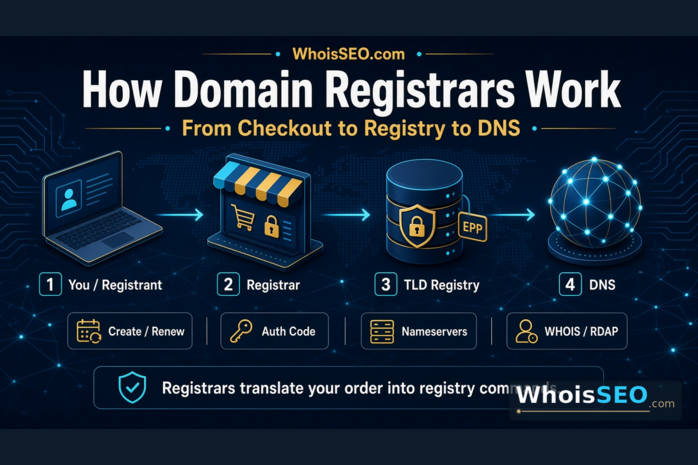
How domain registrars work is less mysterious than the jargon makes it sound. A registrar is the retail layer between you and a top-level domain (TLD) registry: you search and pay in a control panel, and the registrar sends create, renew, update, and transfer commands to the registry that owns the master database for that extension.
This guide walks through the machinery behind that panel—availability checks, registry protocols, DNS handoff, WHOIS/RDAP updates, renewals, and transfers—and shows how to verify what actually happened with free WHOIS lookup and DNS lookup tools on WhoisSEO. For definitions first, see what is a domain registrar? For the buyer’s checkout path, see how domains are registered.
Quick answer: how do domain registrars work?
In one sentence: registrars take your order, talk to the registry over a standardized registration protocol, store your account and billing data, and expose tools so you can manage nameservers, locks, privacy, and renewals.
| Stage | What the registrar does | What you should see afterward |
|---|---|---|
| Search / create | Checks availability, submits a create to the registry | WHOIS shows registrar of record, creation and expiry dates |
| DNS setup | Sets default nameservers or accepts yours | NS (and later A/MX/TXT) resolve in DNS lookup |
| Ongoing management | Updates contacts, privacy, locks; bills renewals | Status flags and dates stay queryable; contacts may be redacted |
| Transfer | Issues or accepts an auth/EPP code with unlock steps | Registrar of record changes after the move completes |
The three systems behind every registration
Every smooth “Buy domain” click hides three cooperating systems:
- Your registrar account — Login, invoices, 2FA, support tickets, and the UI where you edit DNS and locks.
- The TLD registry — Authoritative database for that extension (for example the operator of
.comor.org). It accepts or rejects registrar commands and publishes the TLD zone. - Public directories — WHOIS and RDAP responses (often privacy-redacted) plus DNS, which is separate from WHOIS. Privacy overview: can WHOIS data be hidden?
You almost never speak to the registry directly. That is intentional: registries scale better when thousands of registrars share a common command language instead of millions of end users opening tickets with the database operator.
Step 1: availability and cart logic
When you type a name, the registrar queries the registry (or a cached availability service) and returns states such as available, taken, premium, or reserved. “Available” means a standard create is expected to succeed—not that a marketplace listing is free, and not that every lookalike spelling is clear.
Cart logic then attaches policy options the registry supports for that TLD: term length, contact requirements, premium pricing, and whether privacy or redaction is allowed. Extension choice still matters; compare common endings in difference between .com, .net, and .org.
Step 2: the create command (EPP in plain English)
Most gTLD registrars talk to registries using EPP (Extensible Provisioning Protocol) or an equivalent API. You never see the XML. Operationally, a successful checkout becomes something like:
- Validate contacts and payment.
- Send a create for the domain object with the chosen term.
- Receive success (or a conflict if someone else won the race).
- Store the domain in your account and schedule the first renewal reminder.
That is why two people can click “buy” seconds apart and only one succeeds: the registry is the single source of truth. The registrar’s job is to translate a human checkout into a clean registry transaction—and to surface failures honestly when the name is gone, restricted, or premium-priced.
Step 3: contacts, privacy, and the public record
Registrars store registrant, admin, and technical contacts for billing, recovery, and abuse handling. What the public sees is a different question. Many gTLDs redact personal fields by default or offer a privacy/proxy service that publishes relay contacts instead of your home address.
Important distinction: hiding public WHOIS fields does not delete contacts inside the registrar account. Keep the account email accurate even when the public record says REDACTED. Fake contacts “for privacy” create recovery headaches and can violate terms—use the legitimate privacy product instead.
Step 4: how registrars hand off DNS
Registration reserves the name. DNS makes it usable. After create, a registrar typically:
- Assigns parking or default nameservers, or
- Lets you enter custom NS records for Cloudflare, your host, or another DNS provider
Only after the registry publishes the delegation (and resolvers refresh) will the world follow your A, AAAA, MX, TXT, and CNAME records. WHOIS privacy never hides those records. See what are DNS records? and DNS for beginners.
Practical tip: if the site “does not work” an hour after purchase, check DNS first with WhoisSEO DNS lookup before assuming the registration failed. Registration and DNS are related—but not the same failure mode.
Step 5: locks, status flags, and everyday security
Registrars expose security controls that map to registry status flags. The common ones:
- Client transfer prohibited (registrar lock) — Blocks casual outbound transfers until you unlock.
- Auth / EPP code — Secret needed to move the name to another registrar.
- Account 2FA and recovery email — Protect the panel that can change NS, unlock, or push updates.
A registrar “works” well when these controls are obvious, not buried. Hijacks usually start with a compromised email or panel—not with a mysterious registry bug.
How renewals work inside a registrar
Domains are term leases, not permanent deeds. Near expiry, the registrar bills auto-renew (if enabled) or sends reminders. On payment, it sends a renew command to the registry and the expiry date moves forward. Miss the window and you enter grace / redemption timelines that vary by TLD—recovery gets more expensive and less certain.
Operationally, renewals are why accurate billing contacts matter more than a pretty dashboard theme. If the card fails and the reminder email is dead, the registry does not care that your brand still needs the name.
How transfers work between registrars
Transfers move the retail relationship while the registry keeps the same domain object. The usual flow:
- Unlock at the current registrar and request the auth/EPP code.
- Start an inbound transfer at the new registrar with that code.
- Approve the transfer email / request as required by policy.
- Wait for the registry to complete the change of registrar of record.
Afterward, WHOIS should show the new registrar. DNS may stay the same if you did not change nameservers—another reason to verify both WHOIS and DNS after a move. Related: can you transfer a domain?
Resellers, white labels, and “free domain” bundles
Many hosts and builders resell through an accredited registrar’s backend. Your invoice logo and the WHOIS “Registrar” field can differ. The machinery still works the same: someone accredited must send registry commands. Before you build a critical brand on a promotional domain, confirm who can:
- Issue the auth code
- Toggle transfer lock
- Change the email that receives transfer approvals
Bundles are fine when those answers are clear. They are risky when support says “we cannot unlock that” six months later.
What registrars do not do
Clearing up common expectations helps you troubleshoot faster:
- They do not replace hosting. Paying for a domain does not upload your website files.
- They do not hide DNS. Privacy products mask contacts, not NS/A/MX records.
- They do not guarantee SEO rankings. Rankings follow content and technical quality. Related: does domain affect SEO?
- They cannot invent policy exceptions. Reserved names, local-presence ccTLD rules, and registry holds come from the TLD operator.
How to verify a registrar is doing its job
- Run WHOIS on the root domain. Confirm registrar of record, creation date, expiry, and status flags.
- Run DNS lookup. Confirm NS matches what you set in the panel, then check A/AAAA and MX.
- In the registrar panel, match those public facts: same expiry, same lock state, same nameservers.
- After a transfer or DNS change, re-check both tools once propagation windows pass—do not trust the success toast alone.
If WHOIS still shows the old registrar days after a transfer “completed,” open a ticket with evidence from the lookup. Public records are how you prove what the registry believes.
Common myths about how registrars work
- “The registrar owns my domain.” You hold registration rights for the paid term; the registrar is the retail manager of that registration.
- “Changing hosts changes my registrar.” Only a domain transfer (or a bundled reseller move) changes registrar of record. Pointing DNS at a new host is different.
- “WHOIS privacy means the registrar lost my data.” No—public output is masked; account contacts remain on file.
- “All registrars talk to registries the same way for every TLD.” gTLDs are relatively uniform; many ccTLDs use custom rules and portals.
- “A cheap first year proves long-term value.” Renewal price, DNS limits, lock UX, and support quality matter more for a primary brand.
FAQ: how domain registrars work
Do registrars keep a copy of every domain?
They keep account-side records for the domains you manage with them. The authoritative TLD database still lives at the registry. That split is why a registrar outage can block your panel while the name continues to resolve if DNS is healthy.
Why does WHOIS show a different company than my invoice?
You may have bought through a reseller or white-label storefront. WHOIS lists the registrar of record that holds the registry relationship. Use that field when you need the party responsible for auth codes and locks.
How fast should a new registration appear in WHOIS?
Often within minutes, sometimes longer depending on registry and caching. If payment succeeded but WHOIS stays empty after a reasonable wait, check the registrar order status and support—not random aftermarket listings.
Can a registrar change my DNS without asking?
Policies and product defaults vary. Reputable providers document parking nameservers and product migrations. After any panel change, verify with DNS lookup so you catch accidental NS resets early.
Is ICANN accreditation the same as “best registrar”?
No. Accreditation (where applicable) is an authorization and compliance framework for many gTLDs—not a quality score. Compare renewals, security, and DNS tools yourself.
Conclusion
Domain registrars work as a disciplined retail-and-protocol layer: they collect your order, speak the registry’s language, maintain the account where locks and DNS live, and update the public record you can query later. Once you see that pipeline—create, delegate, renew, transfer—dashboard screenshots make more sense, and failures become easier to isolate.
Before you renew, migrate, or dispute what a panel claims, confirm the registry-facing truth with WhoisSEO’s free WHOIS and DNS tools—then fix the registrar settings that do not match.