What are DNS records? Published: 18 Jun, 2026
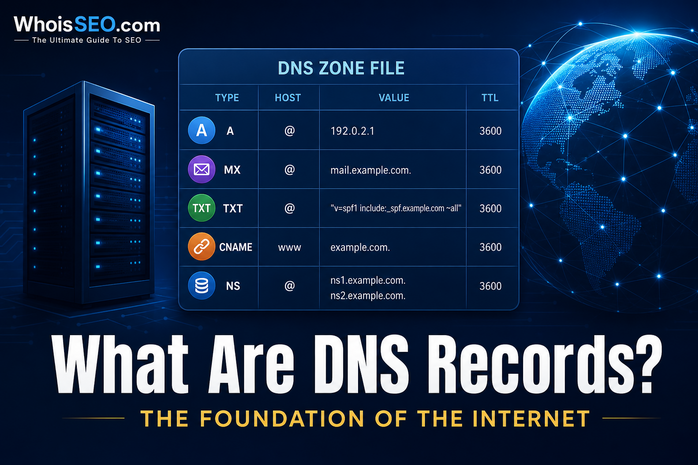
DNS records are the individual rows in your domain’s zone file. Each record type answers a different question: where is the website, which server handles email, which name servers are authoritative, or what verification text should appear for Google or Microsoft. If DNS is the internet’s phonebook, records are the entries on each page.
This guide explains the most important DNS record types, how they work together, when to change them, and how to inspect any domain’s records with free DNS lookup on WhoisSEO.
What is a DNS zone?
A zone is the collection of DNS records for a domain (and optionally its subdomains). The zone is hosted on authoritative name servers listed in NS records at your registrar. When you change an A record at Cloudflare or cPanel, you are editing the zone.
Resolvers worldwide query these servers (or cached copies) whenever someone visits your site or sends email to your domain.
Essential DNS record types
A record (IPv4 address)
Maps a hostname to an IPv4 address. Example: www.example.com → 93.184.216.34. This is the default record browsers need for HTTP/HTTPS hosting. Deep dive: what is an A record?
AAAA record (IPv6 address)
Same role as A but for IPv6. Modern dual-stack hosts publish both A and AAAA. If only A exists, IPv6-only clients may fail to connect.
CNAME record (alias)
Points one name to another hostname instead of an IP. Common for www → apex or SaaS platforms (e.g. shop.example.com → shops.myplatform.com). You cannot place a CNAME at the zone apex on all providers—use ALIAS/ANAME or A records where required.
MX record (mail exchange)
Directs email to mail servers with a priority number (lower = tried first). Missing or wrong MX records cause delivery failures even when the website works. Guide: what is an MX record?
TXT record (text)
Stores arbitrary text—SPF for sender policy, DKIM public keys, DMARC, Google Search Console verification, and more. Multiple TXT records can exist on one name.
NS record (name server)
Delegates a zone to authoritative servers. At the registrar, NS records tell the world which provider hosts your DNS (e.g. AWS Route 53, Cloudflare). See what is an NS record?
SOA record (start of authority)
Metadata about the zone: primary server, admin contact, serial number, refresh timers. Usually auto-managed; useful for advanced troubleshooting.
How records work together (example)
For a typical small business site:
- NS — points to the DNS host (registrar or Cloudflare).
- A / AAAA —
@andwwwpoint to the web server IP. - MX —
@→mail.google.com(Google Workspace) with priority 1. - TXT — SPF includes Google; DKIM keys for email authentication.
Website traffic and email use different record types but share the same domain name.
TTL: how long records are cached
TTL (Time to Live) tells resolvers how many seconds they may cache an answer. Low TTL (300 seconds) speeds up DNS changes; high TTL (86400) reduces query load but slows propagation after updates.
Before migrating hosts, lower TTL a day ahead, make changes, then raise TTL again once stable. Document every change in a runbook—teams often forget which SaaS tool required a specific TXT token six months later.
Reverse DNS and PTR records
Forward DNS maps names to IPs. Reverse DNS maps IPs back to hostnames using PTR records in special in-addr.arpa zones. Mail servers especially care about PTR consistency—missing reverse DNS can hurt deliverability. Use IP lookup when starting from an address instead of a domain.
DNS records vs WHOIS
- WHOIS — who registered the domain and when it expires (WHOIS lookup).
- DNS records — where the domain points technically today (DNS lookup).
Registration can remain at one company while DNS is hosted elsewhere—a common source of confusion for beginners.
How to view DNS records for any domain
- Open WhoisSEO DNS lookup.
- Enter the domain or subdomain.
- Review grouped results: A, AAAA, MX, NS, TXT, SOA.
- Compare with your hosting panel—values should match after propagation.
For background on the lookup process, read what is DNS lookup? and DNS for beginners.
Common DNS record mistakes
- Duplicate SPF TXT records — merge into one SPF string; multiple SPF records break email auth.
- CNAME at apex — not supported on all DNS implementations; use provider-specific aliases.
- Wrong MX priority — backup MX with lower priority (higher number) may never be used as intended.
- Stale A record after migration — site still points to old IP until TTL expires.
- Editing DNS at registrar while NS points elsewhere — changes at the wrong panel have no effect.
When to update DNS records
- Launching a new website on a new server IP.
- Moving email to Microsoft 365, Google Workspace, or another provider.
- Adding domain verification for search consoles or SaaS tools.
- Pointing a subdomain to a CDN or landing page builder.
- Rotating DKIM keys after a security incident.
Conclusion
DNS records are the technical instructions that make domains useful: web, mail, verification, and delegation. You do not need to memorize every RFC detail—know the core types (A, AAAA, CNAME, MX, TXT, NS), respect TTL when migrating, and verify live data with a reliable DNS lookup tool.
Related reading: CNAME record · TXT record · How DNS setup works · Common DNS failures