What is a domain name? Published: 18 Jun, 2026
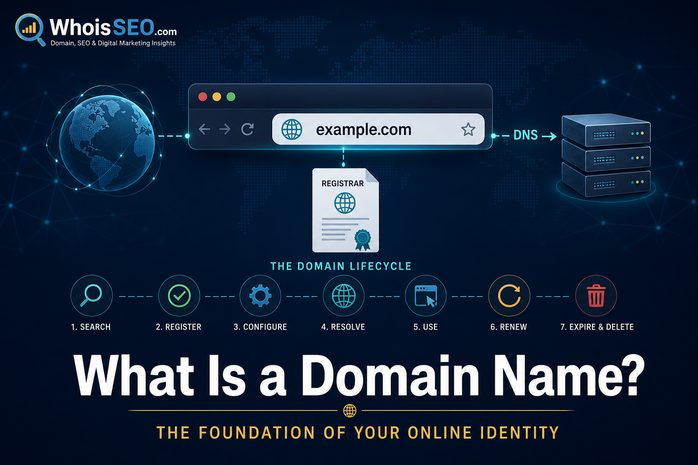
A domain name is the human-friendly address you type to reach a website—like whoisseo.com or example.org. Behind that short label sits a global registration system, DNS configuration, and often email and hosting services. Whether you are launching a business site, researching a competitor, or troubleshooting email, understanding domain names is the foundation of everything else on the web.
This guide explains what a domain name is, how it differs from a URL and an IP address, how registration works, and how to look up any domain with free tools on WhoisSEO.
Domain name vs URL vs IP address
These terms are related but not identical:
- IP address — a numeric location on the internet (e.g.
93.184.216.34). Routers use IPs to deliver packets. - Domain name — a registered label in the DNS hierarchy (e.g.
example.com). - URL — a full web address including protocol and path (e.g.
https://example.com/blog/post).
DNS connects the domain name to an IP so browsers know where to connect. Read DNS for beginners for the lookup process.
Structure of a domain name
Most domains have two or more parts separated by dots, read from right to left:
- TLD (Top-Level Domain) — the suffix such as
.com,.org,.net, or country codes like.uk. See what is a TLD? - Second-level domain (SLD) — the brand or project label you choose (e.g.
whoisseoinwhoisseo.com). - Subdomain — optional prefix such as
www,blog, orshop(e.g.blog.example.com).
ICANN coordinates policy for generic TLDs; country-code TLDs are managed under local rules. Your registrar sells the right to use a name for a limited period—typically one to ten years.
How domain registration works
- Search availability — check if the name is free or taken.
- Choose a registrar — an accredited company that sells domains and interfaces with the registry.
- Register the name — pay for a term; your contact data is stored in WHOIS (often redacted).
- Configure DNS — point the domain to hosting via A, AAAA, or NS records.
- Renew before expiry — expired domains enter grace/redemption and may become available to others.
Registration does not automatically include website hosting. See domain vs hosting differences.
What WHOIS shows about a domain
WHOIS is a public (or partially redacted) database of registration metadata: registrar, creation date, expiry, name servers, and status flags. It does not show website content or DNS records in full detail.
Use WhoisSEO WHOIS lookup to check any domain. For live routing data, follow with DNS lookup. Guides: what is WHOIS lookup? and how to find a domain owner.
Choosing a good domain name
- Memorable and short — easy to spell and say aloud.
- Brand-aligned — matches your business or project name.
- Avoid hyphens and numbers — unless essential for clarity.
- Check trademarks — similar names can create legal risk.
- Prefer established TLDs —
.comstill carries the most trust for global audiences.
Detailed tips: how to choose a professional domain name.
Domain lifecycle: active, expired, dropped
Domains are rented, not owned forever. After expiry, registrars usually offer a grace period, then redemption (expensive recovery), then deletion. At that point the name may return to open registration—attracting backorder services and investors.
Monitor expiry dates in WHOIS and enable auto-renewal for critical brands. Articles: domain expiration date and what happens when a domain expires.
Privacy and security considerations
Historically WHOIS listed registrant names, addresses, and emails publicly. Today WHOIS privacy / GDPR redaction hides much of that data while keeping technical contacts for abuse reports. Privacy does not hide DNS—if a site is live, its records remain queryable unless proxied.
Enable registrar lock, use two-factor authentication, and verify name server changes carefully to prevent hijacking. Large portfolios should export WHOIS data periodically and set calendar reminders 30–60 days before expiry—auto-renewal fails when payment cards expire.
Internationalized domain names (IDN)
Some TLDs support internationalized domain names with non-Latin scripts (Arabic, Cyrillic, Chinese, etc.). IDNs display in Unicode but resolve through punycode (ASCII-compatible encoding starting with xn--). Browsers and email systems must support IDN correctly or users may see confusing homograph attacks—visually similar characters from different alphabets.
Domains and SEO (preview)
Search engines primarily rank content and trust signals, not the domain string alone. However, age, history, and clean WHOIS status can matter indirectly. Avoid expired domains with spam history. More: does domain affect SEO?
How to look up any domain name (free)
- WHOIS lookup — registration dates, registrar, status.
- DNS lookup — A, MX, NS, TXT records.
- IP lookup — if you only have an address, find network and location data.
Replace example.com with the domain you are researching.
Common beginner mistakes
- Assuming buying a domain includes email or website hosting.
- Forgetting to update DNS after moving hosts.
- Letting a domain expire on a production business site.
- Registering a confusingly similar name to a major trademark.
- Ignoring WHOIS status flags like
clientHoldthat block resolution.
Conclusion
A domain name is your address on the internet’s naming system—not the server itself, not the website files, but the label that ties them together through DNS. Register thoughtfully, protect your registrar account, and use WHOIS plus DNS tools to verify ownership and configuration.
Related reading: What is a domain registrar? · How domains are registered · .com vs .net vs .org · Free WHOIS tool